Boost your PC performance with this program
System Mechanic is a powerful system utility program that enables you to fix computer system issues and speed up your PC. Developed by iolo, this software is its flagship optimization solution and offers various security features to help keep your PC stable and safe from online threats.
Top Recommended Alternative

As the eight-time winner of the PC Magazine Editors’ Choice Award, System Mechanic comes in four different versions: the basic tune-up tool, the upgraded version that includes selected advanced features, the business-friendly one, and the full-on PC optimization suite. However, only the basic version has a free limited-time trial.
A handy package to have
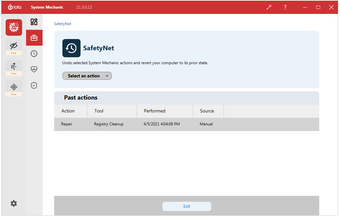
At its core, System Mechanic is an all-in-one package that contains system maintenance tools and performance-boosting features. Its primary features focus on improving PC speed and fixing data errors by deleting junk files, cleaning your directory, defragmenting drives, and more. The software’s interface is user-friendly and easy to navigate. On the left-side ribbon panel are four main tabs: “System Mechanic” and then three extra free tools from iolo which are Privacy Guardian, ByePass, and Malware Killer.
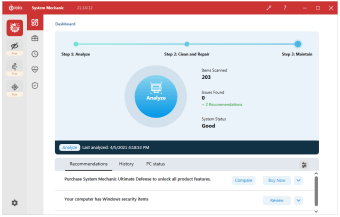
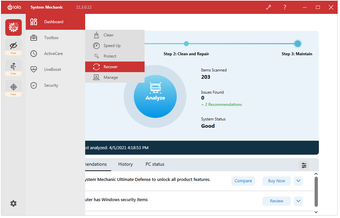
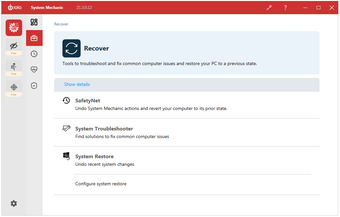
Hovering your cursor over “System Mechanic” will display a second panel with five sections: Dashboard, Toolbox, ActiveCare, LiveBoost, and Security. The Dashboard immediately displays the Analyze button so you can instantly start repairing and fixing any issues. There are three steps it takes: Analyze, Clean and Repair, and Maintain. Meanwhile, opening the Toolbox tab will display five features: Clean, Speed Up, Protect, Recover, and Manage. They each have different tools you can access based on their functions, such as All-in-One PC Cleanup, NetBooster, and Security Optimizer.
The ActiveCare tab is different as it only has toggleable settings on its menu. However, it’s the feature that will automatically scan and repair issues whenever your PC is idle. The LiveBoost tab, meanwhile, has two sub-menus: Real-Time Boost and On-Demand Boost. Both handle computer processing for balanced speed and performance boosts with the help of its PowerSense Mode. Lastly, the Security tab features antivirus and firewall monitors. However, these only detect security programs actively protecting your PC. You’ll need to upgrade your version to get real-time antivirus features.
Is System Mechanic free?
Aside from the basic features of System Mechanic—or rather, System Mechanic Standard—you also have access to three free iolo standalone utilities. Privacy Guardian grants you anonymous online browsing. ByePass secures your passwords and credit card information via encryption. Meanwhile, Malware Killer finds and removes dangerous malware from your PC system. These are also included in the free limited-time trial so you can easily test them out. What’s great about this program, though, is that it offers a Whole Home License and supports an unlimited number of personal computers.
However, you can unlock more features and functionalities by upgrading to other versions of this software. System Mechanic Professional has the base program and additional tools from iolo, including a dedicated antivirus. System Mechanic Business is designed for workplace use and already contains similar features from Professional. Meanwhile, System Mechanic Ultimate Defense is the complete suite of 7 integrated iolo software products between all four editions.
A trusted application
All in all, System Mechanic is one of the most popular PC tune-up programs around for a good reason. Not only does it offer tons of tools at your disposal, but it can also function without your input. While this standard version only fully covers clean-up and booster features, it allows you to try out other utilities that you can avail of from the other versions, if you’re curious about upgrading the program’s capabilities.